.png?width=250&height=138&name=image%20(1).png)
Question: Unable to access Facesheet as it is greyed out in encounter TOC
Answer: On Encounter TOC if the Facesheet is greyed out or disabled for the user, that means the user does not have role access to the Facesheet. In such cases, follow the below mentioned steps.
Step 1. Go to EMR >> Settings >> Configuration
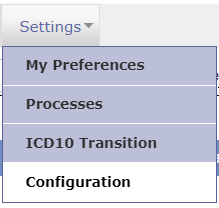
Step 2. Under Admin column click on Role
Step 3. Search and select your role for example: Doctor, Staff, MA etc
Step 4. Search for facesheet under Patient factsheet

Step 5. Check box for facesheet under the Read Column
Step 6. Click OK