.png?width=250&height=138&name=image%20(1).png)
Question: How to send a reminder for the Upcoming appointment?
Answer:
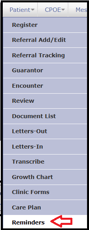
Step 1: Go to Patient >> Reminders.
Step 2: Click on Type >> Select Upcoming appointment.
Step 3: As per requirement the period enter From and To date.

Step 4: Click on Go.
Step 5: Select the Action >> (such as Ignore, Email, Phone Call, Confirmed, and Cancelled by Patient.) that has to be taken with respect to the type of reminders.
Ignore – would take no action, Email – applicable for Patients having email address registered with PrognoCIS, Phone Call - a reminder to call a patient before appointment; Confirmed - confirm an appointment which is either tentative or upcoming; Cancelled by Patient - cancel an appointment which is either tentative or upcoming.
Note: The template to send the email is taken from the tab: Settings >> Configuration >> Email. The Send Email option is not available for ‘Wait Listed’ and ‘Requested’ appointments.