.png?width=250&height=138&name=image%20(1).png)
Question: How To Run A Report For Self-Pay Claims With Different Aging Buckets?
Answer :
Step 1: Please go to Billing Side
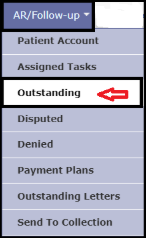
Step 2: Under the "AR/ Follow Up" Tab >> Click On the "Outstanding" option
Step 3: Click on Filter Funnel Icon >> Click On the + sign to "
Step 4: Click on "Outstanding AR expand option
Step 5: Click on "Min OS Days from DOS"- Enter Your Aging Days
Step 6: Click on "Claim Fields" >> Select "Self Pay Claim"- Enter Yes
Step 7: Click on "Apply"
Step 8: This Report can be exported into Excel and Printed.