.png?width=250&height=138&name=image%20(1).png)
Issue: How to reset the password for the patient portal?
Answer:
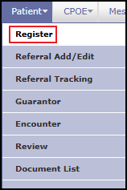
Step 1: Go to the patient's registration screen(Patient>>Register) on PrognoCIS.
Step 2: Click on the login info button i.e. on the extreme right just above the photo of the patient.

Step 3: Set the temporary password for the patient.
Step 4: Ask the patient to login to the Patient Portal with this temporary password.
Step 5: The patient will be asked to set a new password where his/her old password will be a temporary password provided.