.png?width=250&height=138&name=image%20(1).png)
Question/Issue: How to add new Portal Attachments Category
Answer:
Step 1: Go to Settings >> Configuration.
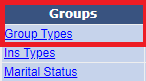
Step 2: Under Groups, click on Group Types.
Step 3: Under Non-System.
Step 4: Click on PA(Name: Portal Attachments Category)

Step 5: Click on Add new button.
Step 6: Enter the Name and click on save.